Install notes · Install notes
Getting Play8oy onto a phone or PC, and checking it's the real one
Play8oy isn't in Google Play or the App Store, so installing it means an unknown-apps prompt on Android or a profile trust step on iPhone. What each step means and what to check.
The old Play8oy page on this site was three buttons and nothing else: one for iPhone, one for an Android file, one for a Windows installer. Those links are long dead. The steps behind them haven't changed much, though, and it helps to know what each one is asking you to agree to.
Play8oy isn't listed in Google Play or the App Store for Malaysia. Whatever device you use, the app comes from outside the official store, which means you're trusting whoever gives you the link. Get it from the same provider who issued your game ID, not from a search result.
Android: the unknown-apps prompt
On Android the app is a file you download and open. The first time, Android stops you with a message that your browser (or file manager) isn't allowed to install unknown apps. Tap Settings, switch on Allow from this source for that one app, go back and install.
Two habits make this safer. Switch that permission off again once Play8oy is installed, so nothing else can slip in the same way. And if Play Protect or your phone warns about the file, or asks for permissions that make no sense for a game (SMS, contacts, accessibility, device admin), cancel and ask your provider what's going on. A slot app needs internet and storage, not your messages.
When you update, the new file should install over the old one. If Android says the package conflicts or the signature doesn't match, don't force it. Uninstall the old app first, and only then install the new file from your provider.
iPhone: trusting the developer profile
iPhone builds of apps like this are signed with an enterprise certificate, a kind Apple gives companies for their own staff apps. After installing, tapping the icon gives an Untrusted Enterprise Developer message. To get past it, go to Settings > General > VPN & Device Management, tap the company listed under Enterprise App, and tap Trust.
You're trusting that company to run apps on your phone, so look at the name before you tap. Apple also revokes these certificates when it finds them used for public apps. When that happens the app closes the moment you open it, on every iPhone at once. Delete it, get the current build from your provider, and trust the new profile. Old iPhone lists about 32-bit and 64-bit models are history now; any iPhone still getting updates is 64-bit.
Windows
The old page also offered a Windows installer. If you use one, scan it before running it, and treat any request for administrator rights as a reason to double-check where the file came from.
Checking you got the real lobby
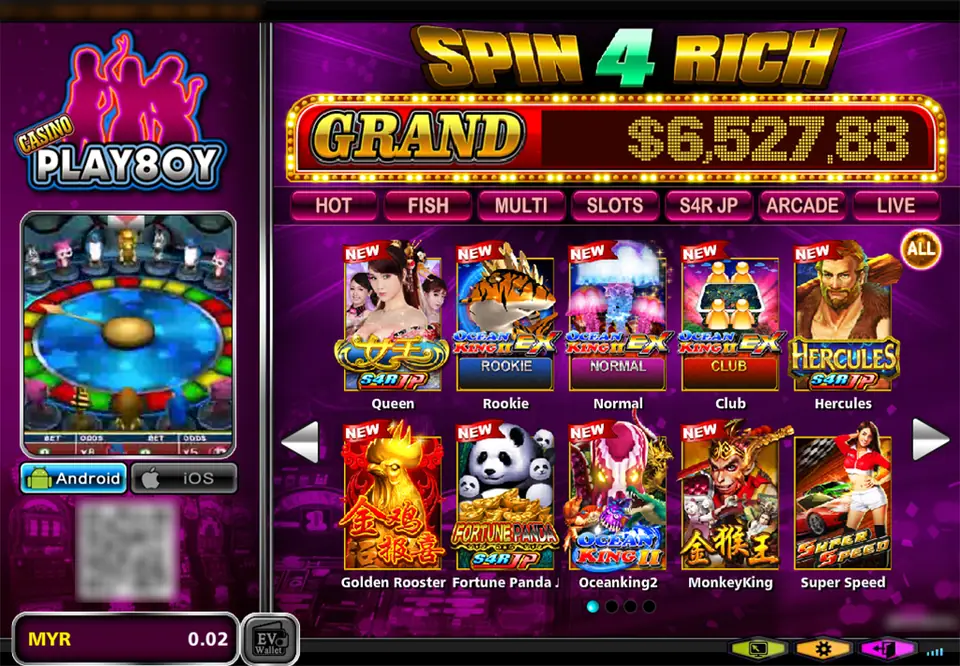
After login, the Play8oy lobby we captured looks like this: the pink PLAY8OY logo top left, a small preview of an animal wheel game, Android and iOS buttons, and your balance in MYR at the bottom next to an EV Wallet button. On the right is a big SPIN 4 RICH banner with a GRAND counter, a row of tabs (HOT, FISH, MULTI, SLOTS, S4R JP, ARCADE, LIVE) and game tiles. The QR code and username are blurred in our copy.
Tiles on the first page include Ocean King II EX in three room sizes, Hercules, Golden Rooster and Fortune Panda, all covered on this site. If the app you installed looks nothing like this, or asks for bank details before you've even logged in, delete it.
How game IDs, top-ups and cuci work is in the Play8oy overview, and every game page is on the Play8oy game list. Other apps' install steps are in install notes. If you don't have an account yet, get a Play8oy game ID from a provider.
Never give anyone your bank TAC, even someone "helping" you install. Play8oy is for adults 18+, and online gambling is restricted in Malaysia; set a limit before your first top-up. See responsible gaming.
Questions people ask
Why isn't Play8oy in the Play Store or App Store?
Real-money casino apps like this one aren't listed there for Malaysia, so the app is handed out as an Android file, an iPhone enterprise build or a Windows installer. That's why the extra permission and trust steps exist.
Will I lose my balance if I delete and reinstall Play8oy?
No. Your credit sits on your game ID on the Play8oy server, not in the app. Reinstalling only replaces the app; log in again with the same ID and password.
My Play8oy iPhone app suddenly won't open. What happened?
Almost always a revoked enterprise certificate. Delete the icon, ask your provider for the current iPhone build, and trust the new developer profile. The company name on it may differ from the old one.
Real-money games; online gambling is restricted in Malaysia. Never top up money you need, and stop when it stops being fun. Responsible gaming.