Install notes · Install notes
Installing Live22: four old buttons, and what each one involved
The old Live22 page had four buttons: iPhone, Android, Windows and Mac. What each install involves today, the warnings you'll see, and how to check the app is real.
Four buttons and nothing else: that was the old Live22 download page. Iphone IOS, Android Phone, Windows Computer and Apple Mac, each pointing at a file on a host that has long since gone. Two of the four were desktop builds, which says something about how people played at the time: on a laptop as much as a phone.
We don't link any of those files, old or new. Get the current build from the provider who gives you your game ID.
Android
The Android app is an installer you download through your browser. The first time you open it, Android will say your browser isn't allowed to install unknown apps. Tap Settings, turn on Allow from this source for that browser only, go back and tap Install. Then turn it off again under Settings > Apps > Special app access > Install unknown apps, so the browser can't quietly install anything else later.
Play Protect may flag the app as unrecognised. That's normal for anything from outside the store, and it's also your cue to be sure where the file came from. A slot lobby needs internet access and storage. If it asks to read SMS, contacts or notifications, or wants to be an accessibility service, uninstall it.
iPhone
The iPhone build comes through an enterprise certificate, not the App Store. After it installs, the first tap on the icon shows Untrusted Enterprise Developer. Go to Settings > General > VPN & Device Management, tap the developer name under Enterprise App, then Trust. The name won't say Live22; it's whichever company the certificate belongs to.
When Apple revokes that certificate, the app stops opening for everyone at once. Nothing happens to your balance, which sits on your ID. Delete the app, remove the old developer entry, and ask your provider for the new build.
Windows and Mac
On Windows, an installer from outside the Microsoft Store usually triggers a blue Windows protected your PC screen from SmartScreen. You can get past it with More info and Run anyway, but only do that for a file you got straight from your provider, and scan it first. A slot client has no reason to ask for administrator rights every time it starts.
On a Mac the equivalent is Gatekeeper: the app "can't be opened because Apple cannot check it for malicious software". You can allow it from System Settings > Privacy & Security with Open Anyway. The same rule applies. If you don't know exactly where the file came from, don't.
Checking you got the real thing
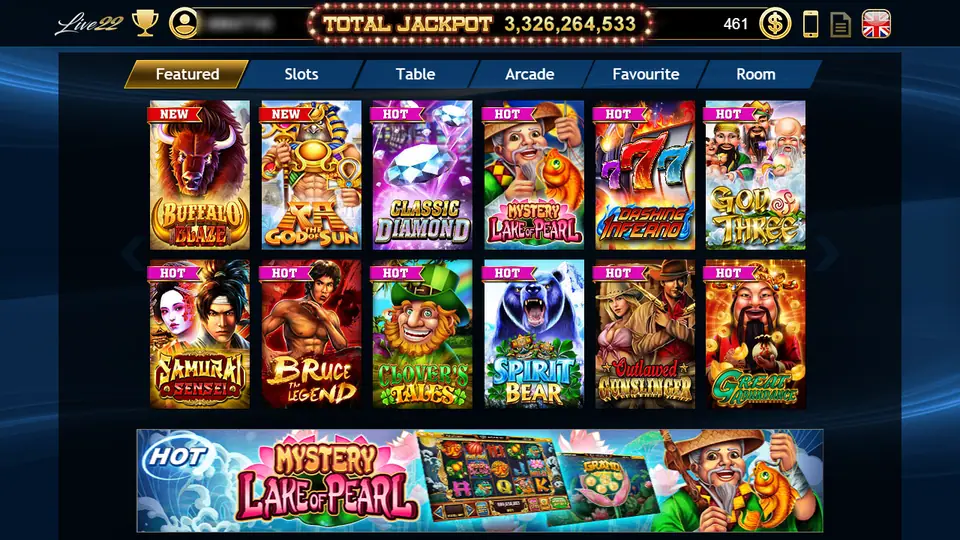
The genuine lobby looks like the screenshot at the top of this page: the Live22 logo top left, a trophy and your account number, a TOTAL JACKPOT counter in lights, and six tabs (Featured, Slots, Table, Arcade, Favourite, Room). On the phone, some tiles carry a TAP TO DOWNLOAD label the first time; the game loads its files when you open it, so do that on Wi-Fi if data is tight.
A few habits worth keeping:
- The app never needs your bank login, card number, TAC or OTP. Top-ups go through your provider.
- Crop your account number out of any screenshot you share.
- Change the password you were given if the app lets you.
Once you're in, the Live22 overview explains the lobby and cuci, and the Live22 games list has every slot we've written up. Mystery Lake of Pearl is the one the lobby promotes hardest, and Pop Kittens is a good first look at how the bet bar works. Other apps are covered under install notes. If you don't have an account yet, you'll need to get a Live22 game ID before any of this is useful.
18 and over only. Online gambling is restricted in Malaysia; set a limit before your first top-up and read our responsible gaming notes.
Questions people ask
Where do I download Live22?
Not from Google Play or the App Store, and not from us: we don't host or link the files. Ask the provider who issued your game ID for the current build.
Is there still a Live22 app for Mac?
The old page linked a Mac installer next to the Windows one. Whether a current Mac build exists depends on what your provider can give you; many players now use the phone app only.
Why does Live22 ask to download a game after I install it?
In a phone capture of the lobby, some game tiles carry a TAP TO DOWNLOAD label. It looks like the app fetches each game's files the first time you open it, so the first launch of a new game needs a connection and some storage.
Real-money games; online gambling is restricted in Malaysia. Never top up money you need, and stop when it stops being fun. Responsible gaming.