Install notes · Install notes
Getting Joker123 onto a phone, and knowing the real lobby when you see it
The old Joker123 page had two links, iPhone and Android. What each install involves, the warnings to expect, and the lobby details that tell you the app is genuine.
The old Joker123 download page had two links, one marked IOS and one for Android, and the Android one was broken even in the saved copy: the link ran straight into a piece of page code. There was no Windows or Mac version listed. For most players Joker123 has always been a phone app, and that's what these notes cover.
Nothing on this page links to a file. Get the current build from the provider who gave you your game ID.
Android
The app comes as an installer that your browser downloads. When you open it, Android will say the browser isn't allowed to install unknown apps. Tap Settings, switch on Allow from this source for that one browser, go back and tap Install.
When it's done, go to Settings > Apps > Special app access > Install unknown apps and switch the browser back off. Otherwise anything it downloads later can install with a single tap.
Play Protect will probably call the app unrecognised. That's expected outside the store, but look at the permissions before you open it. A slot lobby needs network access and storage, and nothing else of note. Say no to SMS, contacts, call logs and accessibility access. If you're updating over an old version and Android reports a signature conflict, stop and ask your provider for a clean file rather than uninstalling to force it through.
iPhone
On iPhone, Joker123 arrives through an enterprise certificate. The install runs from a link; the first time you tap the icon you get Untrusted Enterprise Developer. Close that, then open Settings > General > VPN & Device Management, pick the developer name under Enterprise App and tap Trust. The name will be a company you've never heard of, not Joker.
Apple pulls these certificates when it finds them used for public apps, and the app then stops opening on every phone at once. Your balance is on your ID, so nothing is lost. Delete the app, remove the old developer entry, and get the new build from your provider. While you're in that settings screen, remove any other developer entries you don't recognise.
What the real lobby looks like
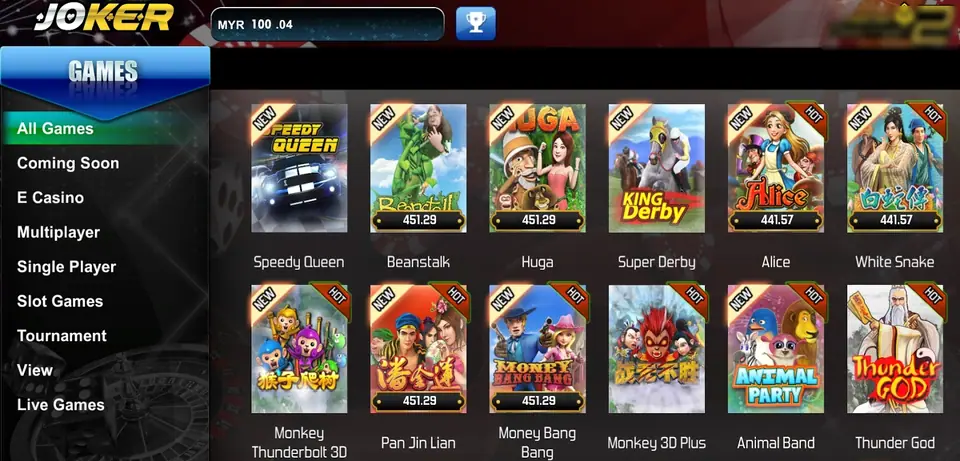
The picture at the top of this page is a genuine Joker123 lobby. The JOKER logo sits top left, the balance box next to it shows MYR, and a trophy button follows. Down the left is a GAMES menu: All Games, Coming Soon, E Casino, Multiplayer, Single Player, Slot Games, Tournament, View and Live Games. The tiles carry NEW or HOT flags and, on some, a running jackpot figure; ours show Speedy Queen, Beanstalk, Huga, Super Derby, Alice, White Snake, Money Bang Bang and Thunder God among others.
Inside the games, the money changes from MYR to GP, and every slot has the same bar: LINES, PLAY, TOTAL PLAY, WIN and SPIN. If you're shown something that asks for your bank login, a card number, a TAC or an OTP, it isn't Joker123. Top-ups go through your provider, never through the app.
Two more habits: crop your game ID out of any screenshot, and change the password you were given if the app lets you.
The Joker123 overview explains GP, top-ups and cuci, and the Joker123 games list has every slot we've covered. Huga and Money Bang Bang are both on the lobby screen above if you want a first game to check. Install notes for the other apps are under install notes. If you don't have an account yet, get a Joker123 game ID from a provider first.
For adults 18 and over. Online gambling is restricted in Malaysia; set your limit before the first top-up and read responsible gaming.
Questions people ask
Where can I download Joker123?
It isn't in Google Play or the App Store, and we don't host or link it. Get the current link from the provider who issued your Joker123 game ID.
My Joker123 app stopped opening on iPhone. Is my balance gone?
No. The balance sits on your game ID, not the phone. An iPhone build that suddenly won't open has usually had its enterprise certificate revoked. Delete it and ask your provider for the current build.
Why does my Joker123 lobby show a different logo in the corner?
The lobby capture on this page has an operator's badge in the top right corner. Providers can hand out builds carrying their own branding, so the corner logo may differ between players. The JOKER logo, the GAMES menu and the MYR balance should be the same.
Real-money games; online gambling is restricted in Malaysia. Never top up money you need, and stop when it stops being fun. Responsible gaming.