Install notes · Install notes
Installing SKY777: one Android file, one iPhone build and the checks in between
SKY777 isn't in any app store. What the Android and iPhone install steps involve, why the iPhone app can stop working overnight, and what a genuine install looks like.

The old SKY777 download page was about as short as a page can be: "Iphone IOS" with one link under it, "Android Phone" with another. No instructions, no Windows version, no split between old and new iPhones. The links have been dead for years. What still applies is what happens on your phone when you install an app like this, so that's what this page covers.
We don't host or link SKY777 files. Ask the provider who gives you your game ID for the current link, and don't install a copy someone else forwards to you.
Android
On Android, SKY777 is an installer file you download through the browser. Since it's not from Google Play, the phone stops you and says the browser can't install unknown apps.
- Tap Settings on that message.
- Turn on Allow from this source for that browser only.
- Go back and tap Install.
- Once it's installed, open Settings > Apps > Special app access > Install unknown apps and switch the browser off again.
Play Protect will likely flag the app as unrecognised. Expected for a file from outside the store, but a reminder to be sure where it came from. If you're installing an update and Android refuses because the app "conflicts" with the one already installed, don't work around it. Different signatures can mean the file has been tampered with. Uninstall, and get a fresh link from your provider.
Then look at the permissions. A game lobby needs the internet and not much else. If SKY777 asks for your SMS, contacts, call log or accessibility access, uninstall it.
iPhone and iPad
The iPhone version is an enterprise-signed build, installed from a link rather than the App Store. The first time you tap the icon, iOS says Untrusted Enterprise Developer.
- Tap Cancel.
- Open Settings > General > VPN & Device Management.
- Under Enterprise App, tap the developer name. Expect a company name that has nothing to do with SKY777.
- Tap Trust, then confirm.
Apple revokes certificates like this when it finds them used outside a company. When that happens the app stops opening, for everyone with that build, overnight. Your game ID and balance are fine. Delete the app, get the new build from your provider, and remove the old developer entry from Device Management so you're not trusting a company you no longer need.
What a genuine install looks like
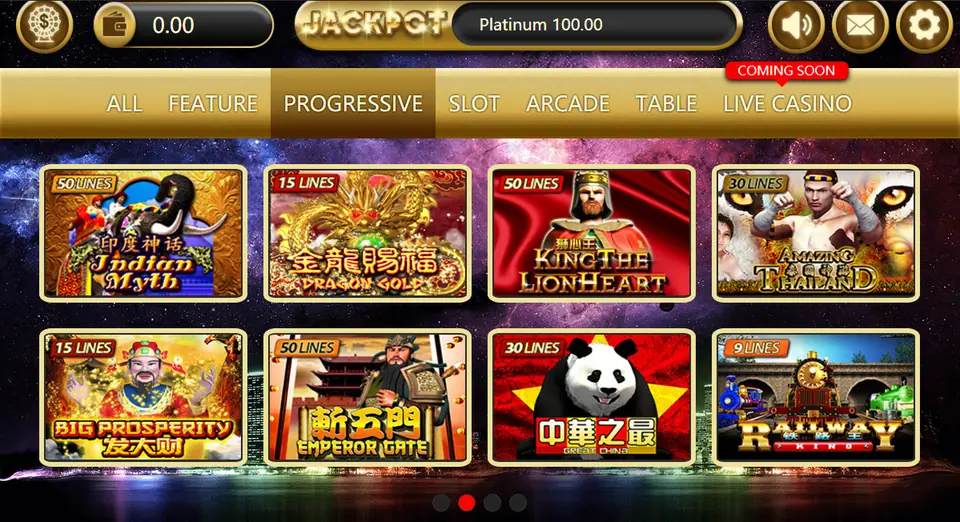
After you log in, the SKY777 lobby has a gold JACKPOT bar across the top, sound, mail and settings icons on the right, and a row of tabs: ALL, FEATURE, PROGRESSIVE, SLOT, ARCADE, TABLE and LIVE CASINO. Each game tile shows its line count in the corner. Games like Sea Emperor and Sic Bo show balances in MPV with a denomination box, and your account code in the top right corner. Crop that code out of any screenshot you share.
Some habits that help:
- No part of the app should ask for your bank login, card number, TAC or OTP. Top-ups go through your provider.
- Change the password your provider set, if the app lets you.
- Don't let anyone "help" by installing it on your phone for you.
The SKY777 overview explains accounts, MPV and cuci, and the SKY777 games page lists every game we've written up. Other apps are under install notes. No account yet? Get a SKY777 game ID from a provider first.
18+ only. Online gambling is restricted in Malaysia. Set your limit before you install, and read responsible gaming.
Questions people ask
Why does SKY777 say Untrusted Enterprise Developer on my iPhone?
Because it's signed with an enterprise certificate instead of coming from the App Store. Go to Settings > General > VPN & Device Management, tap the developer name under Enterprise App and choose Trust. Only do that for a build your own provider sent you.
Will reinstalling SKY777 reset my balance?
No. The balance belongs to your game ID on the SKY777 server. A reinstall only replaces the app; log in again with the same ID.
Where do I download SKY777?
It isn't in Google Play or the App Store, and we don't host or link the files. Ask the provider who issued your game ID for the current link.
Real-money games; online gambling is restricted in Malaysia. Never top up money you need, and stop when it stops being fun. Responsible gaming.