Install notes · Install notes
Putting Lucky Palace on a phone or PC: what each install involves
The old LPE88 page was four buttons and no instructions. What installing Lucky Palace on Android, a Windows PC or an iPhone actually involves, and what to check before you log in.
Four headings and four buttons. That's all the old LPE88 download page ever had: Android (Slot Only), Android (Live Games), Windows Computer and Play In Online. No iPhone option, no steps, not a word about what your phone would say when you tapped them. The files have long since moved, and I'm not linking any. The install process, though, is the same as it was, and it's where people get into trouble.
Only take the current build from the provider who gave you your LPE88 game ID. A file from a search result or a stranger's group chat can look identical and still be something else.
Android: slots or live
The two Android apps were separate downloads. The slot app holds the Playtech slots, the jackpot games and the RNG table games. The live app was for live-dealer games only. If you're here for the slots, you only need the first.
Because it isn't from Google Play, Android will block the install and tell you the app you downloaded it with (usually Chrome) isn't allowed to install unknown apps. What to do:
- Tap Settings in that message and turn on Allow from this source, for that one app only.
- Go back and install.
- Open Settings > Apps > Special app access > Install unknown apps and turn it off again.
That last step is the one people skip. Left on, the browser can install whatever it downloads next with a single tap.
When you first open the app, look at what it asks for. A casino lobby needs internet access and maybe storage. It has no business asking for your SMS, contacts, call history, or to be an accessibility service. Any of those is a reason to uninstall straight away. And if Play Protect flags it as harmful (not just "unknown"), believe it.
The Windows client
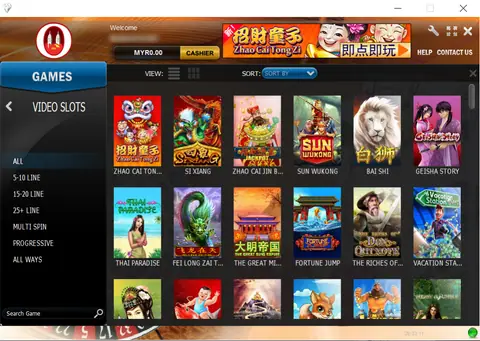
LPE88 had a proper PC program, and a good share of our game screenshots come from it. Age of the Gods, Great Blue and Highway Kings were all captured there: a GAMES menu across the top (Featured, New, Slots, Table & Cards, Arcade, Live Dealers, Progressive Games, Scratch), the balance in MYR in the bottom-left corner, and the older coin, Bet One and Bet Max controls.
If a provider offers you a PC version today, scan the installer before running it, don't give it administrator rights unless you understand why it needs them, and keep it off any computer you use for online banking. Some players run the Android app in an emulator instead; the same rule about where the file comes from still applies.
iPhone
There was no iPhone button. If you're offered an iPhone build now, it won't come from the App Store. It'll be installed from a link and signed with an enterprise certificate. The first time you tap the icon you'll see Untrusted Enterprise Developer. Go to Settings > General > VPN & Device Management, pick the company under Enterprise App (it won't be called Lucky Palace) and tap Trust.
Apple cancels these certificates when it notices them, and the app then stops opening without warning. Your balance is on your game ID, not the phone, so nothing is lost. Delete the icon, remove the old developer entry, and ask your provider for a fresh build.
Before you log in
The real LPE88 only ever asks for your game ID and password. If anything in the app asks for your bank username, a TAC or an OTP, delete it. Once you're in, the games have the grey "Local" bar at the top with the time and your ID, as on Legacy of the Wild and our other mobile captures.
The LPE88 overview explains accounts and cuci, and the LPE88 games list covers what's inside. Install pages for the other apps are under install notes. Without an account the app does nothing, so get an LPE88 game ID from a provider first.
18+ only. Online gambling is restricted in Malaysia. Set a spending limit before your first top-up, and read responsible gaming.
Questions people ask
Which LPE88 Android app do I need?
The old page split it into a slot app and a live-games app. If you want the slots and jackpot games covered on this site, the slot app is the one. The live app was only for live-dealer tables.
Is there an LPE88 app for iPhone?
The old page didn't offer one. If a provider gives you an iPhone build, it will be signed with an enterprise certificate and needs a Trust step in Settings before it opens.
Can I play LPE88 on a computer?
There used to be a Windows client, and several of our game pages (Age of the Gods, Great Blue, Highway Kings) were captured in it. Whether a current PC version exists depends on your provider.
Real-money games; online gambling is restricted in Malaysia. Never top up money you need, and stop when it stops being fun. Responsible gaming.